Version 3.0 · Windows 10 and 11

An idle printer means ink drying up. Let InkTankCare take care of it.

A small CMYK strip printed at the interval you choose keeps the printhead nozzles in use — preventive maintenance that helps prevent the clogging that hits people who rarely print. It runs on its own, even with the app closed.
$7.99 $ 4.99 Launch offer · one-time purchase, no subscription · until 09/16/2026
15-day trial No subscription 6 languages No admin rights needed
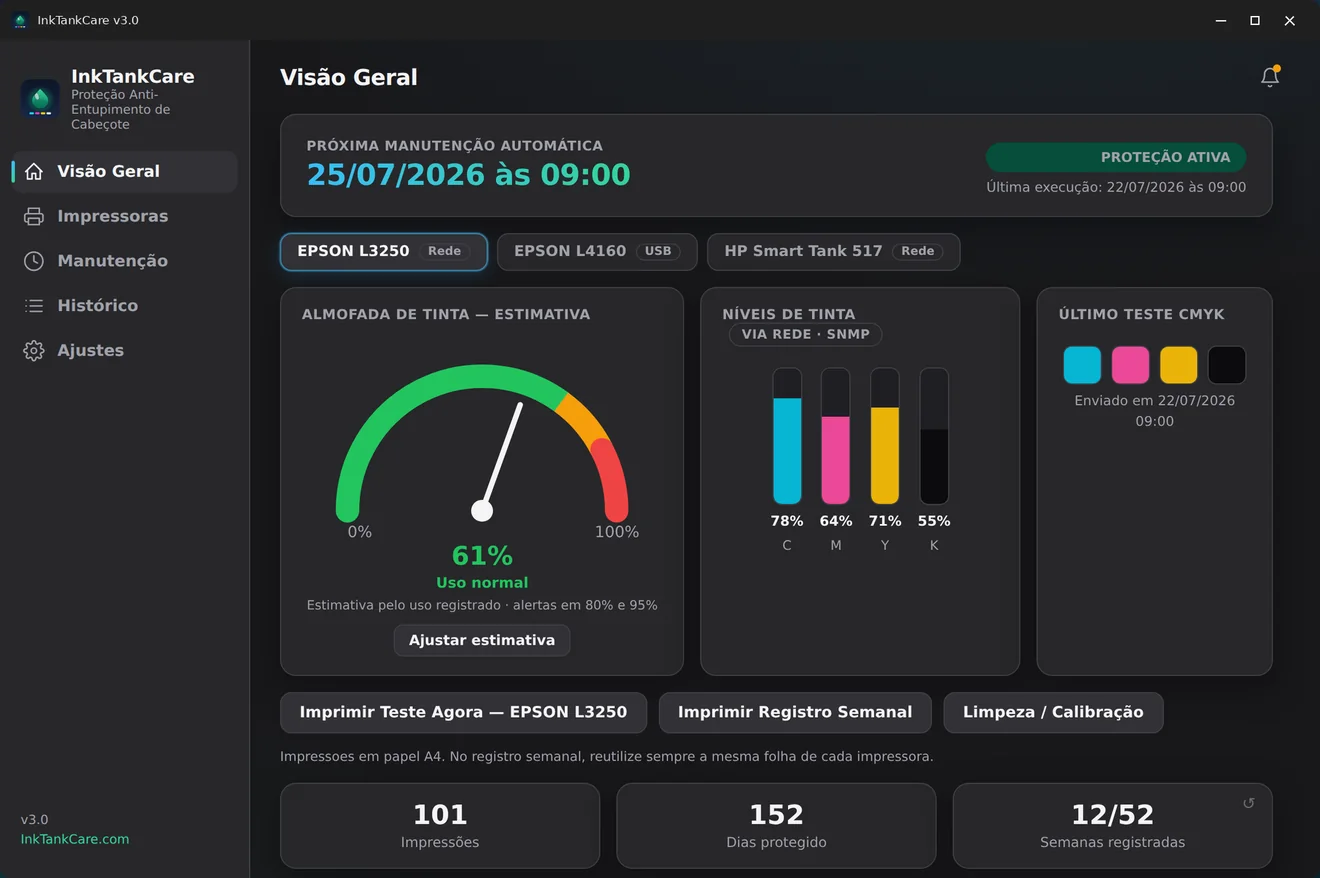
InkTankCare 3.0 Overview panel showing the next automatic maintenance, ink pad meter and ink levels
Next maintenance07/25/2026 at 09:00
Why this happens

Clogging punishes exactly those who print the least

Ink dries inside the nozzles when the printer sits idle for days. When you finally need it, the page comes out streaked — or blank.

Idle means drying ink

A few weeks without printing is enough for ink to harden in the printhead nozzles. It is the most common failure in home and small-office ink tank printers.

Cleaning is expensive in ink

A deep printhead cleaning flushes ink through every channel to clear the blockage — and does not always work the first time. Repeating the cycle uses far more ink than a test strip.

Prevention uses a fraction

Keeping the nozzles in use with a small strip at regular intervals reduces the risk of ever reaching the deep-cleaning stage. That is what InkTankCare handles — on its own.

How it works

Set it up in a minute. Then forget it.

Install from the Microsoft Store

Installation and updates through Microsoft's own store. No administrator password required and a small footprint.

Pick your printers

InkTankCare lists the printers installed in Windows — USB, Wi-Fi and network. Enable protection on the ones you want, one or all of them.

Activate and let it run

Set the interval and time. The app sits in the system tray, starts with Windows and shows the exact date and time of the next maintenance.

Features

A dashboard that shows your printer's real status

Brand-new interface in version 3.0, with light and dark themes following Windows.

Automatic maintenance with date and time

The Overview panel shows when the last run happened and exactly when the next one is due. Each printer has its own cycle, and the history logs everything — automatic, manual, weekly or catch-up.
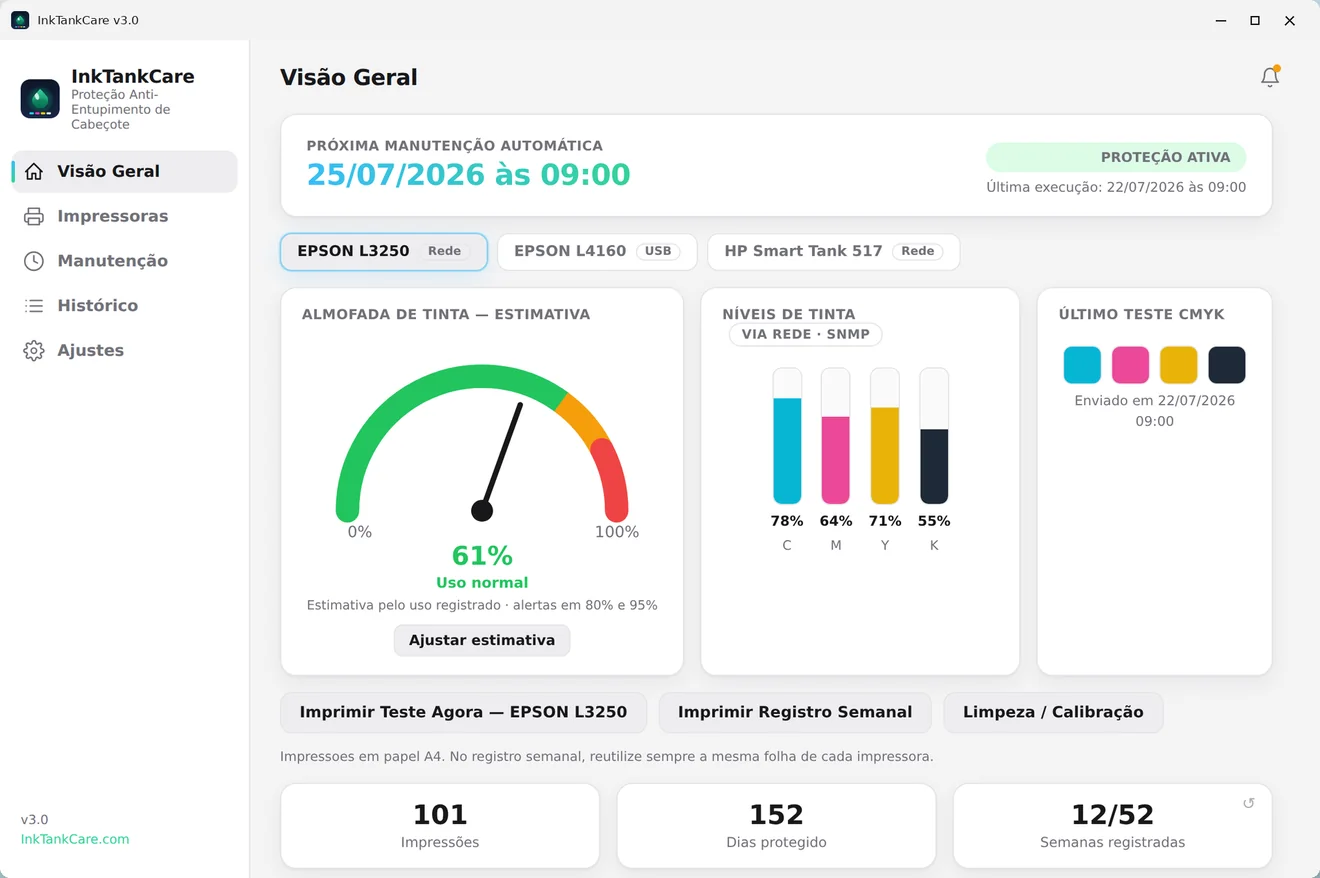
InkTankCare in the Windows light theme

Ink pad meter Estimate · Epson only

Track the estimated wear of the ink pad, with preventive alerts at 80% and 95%. It is an estimate calculated from the usage the app itself records — not a reading of the printer's internal counter — and it is available on Epson printers only.
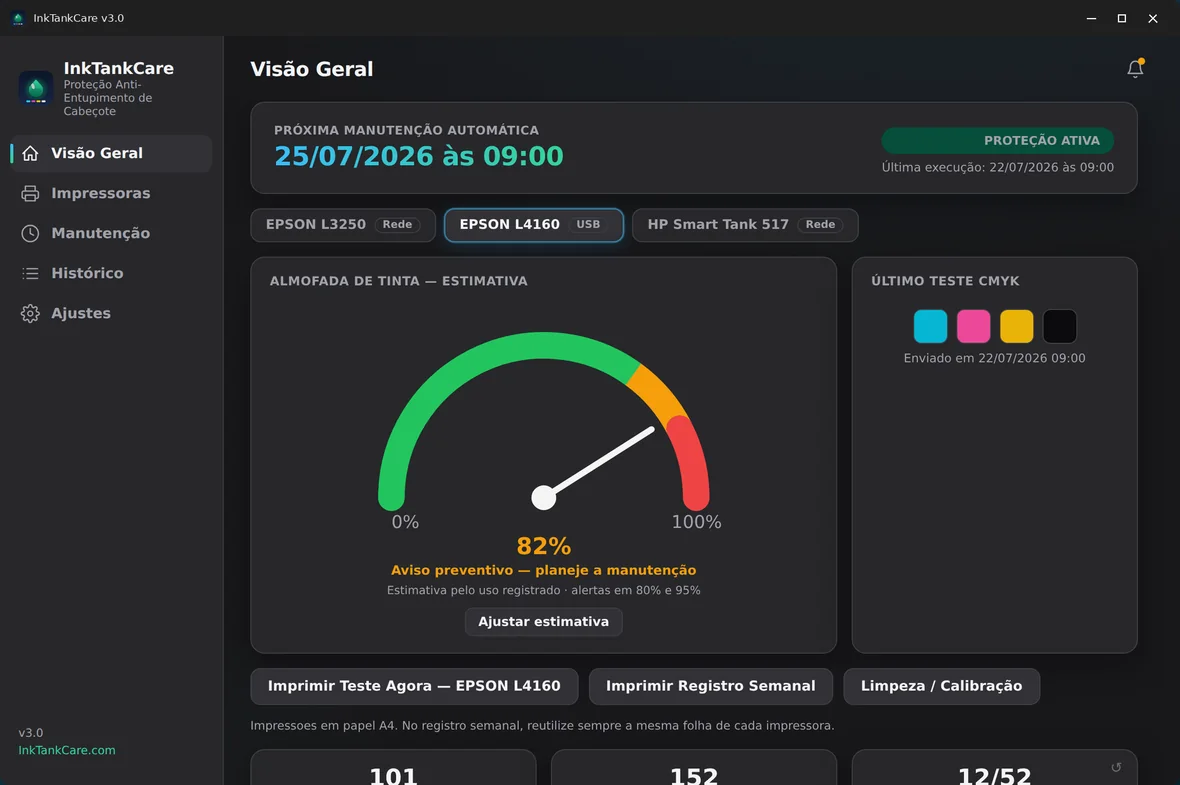
Ink pad wear meter at 82% with a preventive warning

Full history with filters

Every action is logged with date, time, printer and result. Filter by printer or action type and see the distribution for the period — useful to confirm the routine is really running.
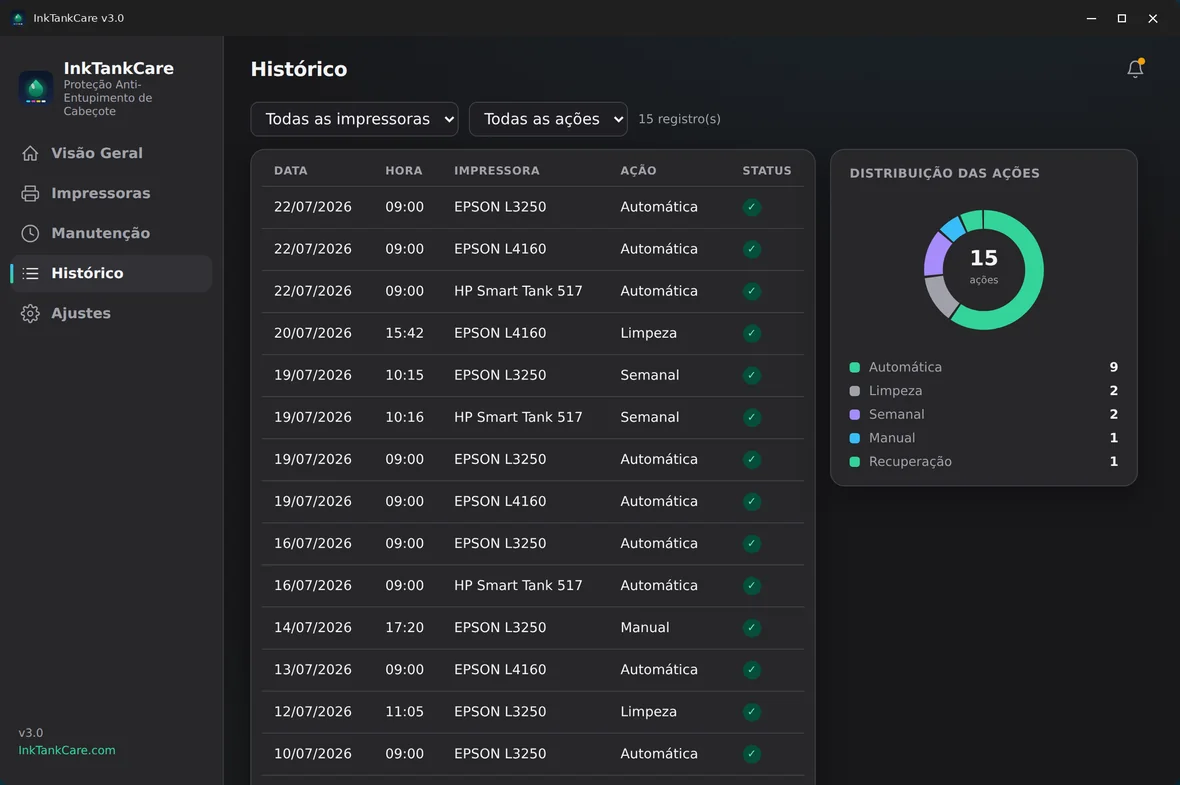
InkTankCare History screen with filters and action distribution

Per-printer control

Each printer is listed with the monitoring modules that actually work on it — and the ones that do not are visibly switched off. No promises: the screen shows the truth about your hardware. Scheduled CMYK protection works on all of them.
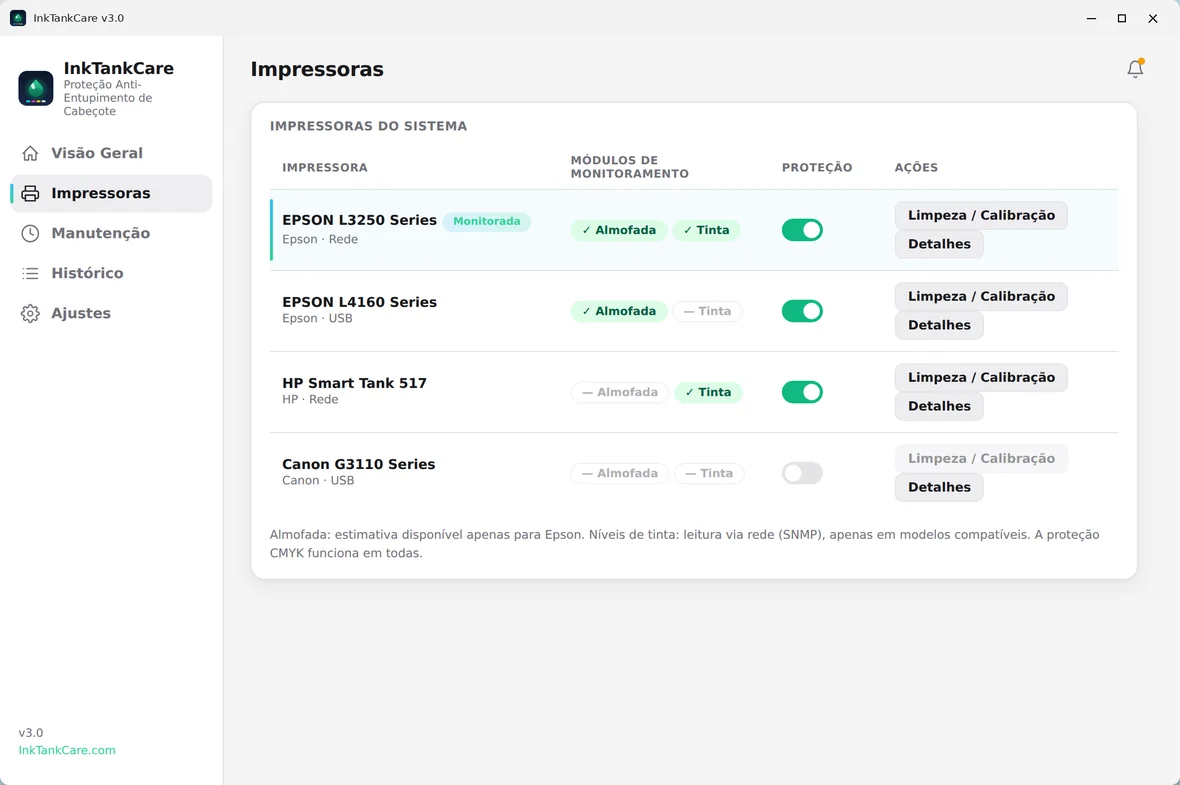
Printers screen listing Epson, HP and Canon with the modules available on each

Weekly log on a single sheet

One sheet with 52 boxes per printer. Each week you put the same sheet back in and the app prints that week's box in the exact position — a whole year of maintenance recorded on a single page.
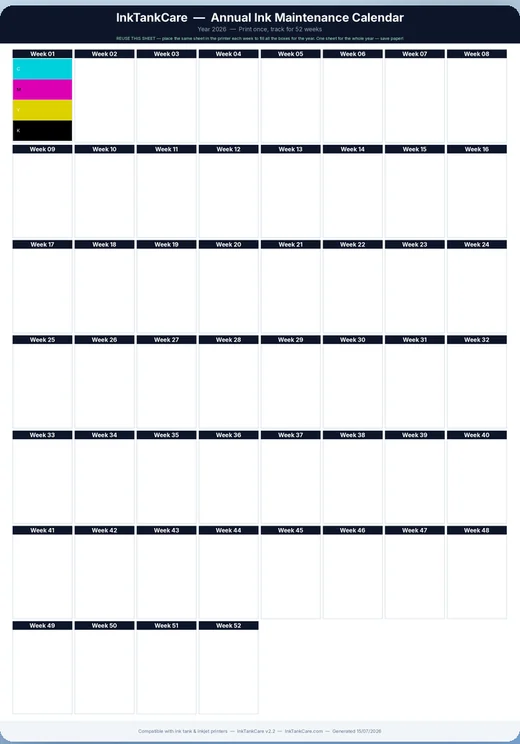
Annual log sheet with a 52-week grid

The CMYK test strip

This is what gets printed: a compact block with the four colors and a gradient that exposes nozzle failures, stamped with date and time. It uses little paper and little ink.
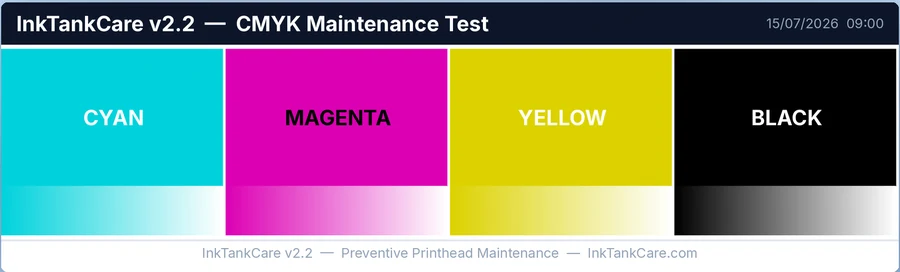
CMYK test strip printed by InkTankCare

Ink levels over the network

Read via SNMP, available only on compatible network printers.

System tray

Sits quietly next to the clock and starts with Windows.

Light and dark theme

The interface automatically follows your Windows theme.

Six languages

Portuguese, English, Spanish, French, German and Italian.

Compatibility

What works on each printer

Scheduled CMYK protection — the heart of the product — works on any inkjet printer installed in Windows. Monitoring, however, depends on the manufacturer and the connection. Check before you buy:

→ Swipe the table sideways to see all columns.

FeatureEpson
network
Epson
USB
Other brands
network
Other brands
USB
Scheduled CMYK printingYesYesYesYes
Weekly log (52 boxes)YesYesYesYes
History and schedulingYesYesYesYes
Ink pad meter EstimateYesYesNoNo
Ink levels (SNMP)Compatible modelsNoCompatible modelsNo
The ink pad meter is an estimate based on the usage recorded by the application, available on Epson printers only. Ink levels are read over the network (SNMP) and appear only on models that answer that query. Laser printers have no inkjet printhead and are not the product's audience.
Pricing

Try it for 15 days. Then buy once and you're done.

Lifetime license
$7.99$4.99

Launch offer until 09/16/2026 · price in US dollars, one-time charge, no subscription

  • 15-day free trial with every feature
  • Automatic CMYK prints on as many printers as you like
  • Ink pad meter and ink levels, where supported
  • Weekly log, history and light/dark themes
  • Six languages and updates through the Microsoft Store
  • E-mail support
Get it from Microsoft Store

Requirements: Windows 10 version 1809 or later, or Windows 11 · the interface uses the WebView2 Runtime, already included in Windows 11 · payment and licensing handled by Microsoft.

Support

Frequently asked questions

How much ink do the maintenance prints use?
A small fraction: the strip uses only part of the page, with the four colors. The whole point is to avoid ever reaching a deep printhead cleaning, which flushes ink through every channel. Exact consumption varies with the printer model and the interval you choose.
Does the computer have to stay on?
The print happens if the computer is on at the scheduled time. If it is off, InkTankCare runs the maintenance at the next opportunity, when you sign in to Windows — the entry is marked as catch-up in the history.
Do I have to keep the app open?
No. It sits in the system tray next to the clock and starts with Windows. You can close the window normally.
What happens when the 15 days end?
The trial gives access to every feature. When it ends, the automatic maintenance functions are locked until you buy the license; your data, history and settings stay on the computer and work again as soon as the license is activated.
Will it work with my printer?
Scheduled CMYK printing works with any inkjet or ink tank printer installed in Windows — including Epson EcoTank, HP Smart Tank and Canon MegaTank, over USB, Wi-Fi or network. The ink pad meter is exclusive to Epson printers, and ink levels depend on a network (SNMP) reading on compatible models.
Does the ink pad meter read the printer's counter?
No. It is an estimate calculated from the usage InkTankCare itself records, with preventive alerts at 80% and 95% so you can plan maintenance ahead. It does not replace the manufacturer's internal counter or a technical assessment.
Is it useful for laser printers?
No. Laser printers use toner and have no inkjet printhead, so they do not suffer this kind of clogging. InkTankCare is built for inkjet and ink tank printers.
Which languages is the app available in?
Portuguese, English, Spanish, French, German and Italian — the language is detected automatically from Windows and can be changed in the settings.
How do I reach support?

Start with the 15-day free trial

Install it, pick your printer, switch protection on. After that, the routine runs by itself.